Gearjury may earn a commission when you buy through a retailer link, at no extra cost to you.
Guide
How to Hardwire a Dashcam to Your Car
A hardwire kit connects the dash cam to suitable constant-power and ignition-switched circuits, plus earth. Correct circuit choice and battery protection matter more than hiding the cable.
GGearjury editorial team · Updated 15 October 2026· 8 min
01
Confirm that hardwiring suits the car and camera
Before learning how to hardwire a dashcam, check the vehicle handbook, camera manual and hardwire-kit compatibility. Some vehicles use sensitive electrical systems or have warranty and service requirements that make professional installation the sensible option.
02
How to hardwire a dashcam to the fuse box
A typical parking-mode kit needs a constant-power feed, an ignition-switched feed and an earth connection. Identify circuits with the vehicle documentation and a suitable circuit tester; never rely on fuse position or wire colour alone.
03
Avoid safety-critical circuits
Do not tap circuits for airbags, braking, steering, engine control or other safety-critical equipment. Choose only a circuit and fuse-tap orientation permitted by the vehicle and kit instructions, with the correct fuse arrangement for both original and added circuits.
04
Route the cable without obstructing airbags
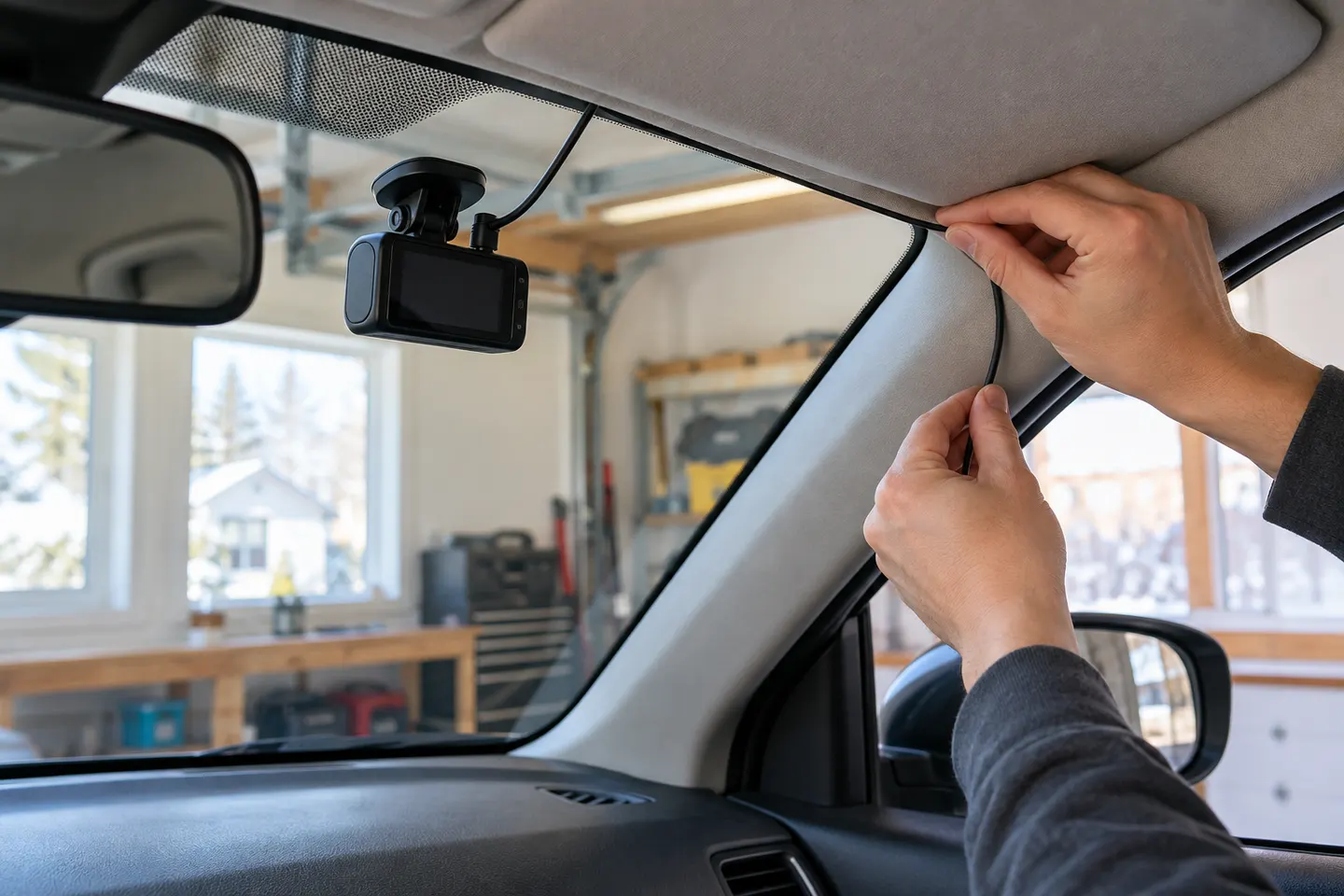
Run the cable securely along trim while keeping it clear of pedals, controls, sharp metal and moving parts. Do not route it across an airbag deployment path; side-curtain airbags commonly sit behind pillar and roof trim.
05
Set low-voltage and timer protection
Configure the supported battery-protection settings for the vehicle and usage pattern. A cut-off does not make recording unlimited, and an ageing or infrequently driven battery may tolerate less parked load.
06
Test driving and parking behaviour
With the vehicle safely stationary, confirm normal recording with ignition on, the transition to parking mode after shutdown and clean restart behaviour. Check for warning lights or disrupted vehicle functions before replacing trim.
07
Know when to use an installer
Stop if the fuse layout is unclear, the vehicle uses an unfamiliar power-management system or trim removal would cross an airbag area. A qualified auto electrician or experienced dash-cam installer can verify the circuits and cable route.
Common questions
Questions before you buy
How do you hardwire a dashcam to a fuse box?
Use a compatible kit connected to an approved constant-power circuit, ignition-switched circuit and earth point, following the vehicle and camera instructions. Verify each circuit rather than guessing.
Can I hardwire a dash cam myself?
Only if you can safely identify suitable circuits, install the correct fuse taps and route wiring clear of airbags and controls. Otherwise, use a qualified installer.
Will hardwiring a dash cam drain the car battery?
It adds an electrical load while parked. A supported low-voltage cut-off or timer reduces the risk but does not replace a healthy battery and correct configuration.
Which fuse should I use for a dash cam?
There is no universal fuse position. Consult the vehicle documentation and test a non-safety-critical circuit that meets the hardwire kit's requirements.
Does hardwiring enable parking mode?
It can provide the constant and ignition-switched power signals required by compatible cameras. Parking mode must still be enabled and configured for the exact model.
A plug-in installation suits basic driving recording; professional hardwiring is the safer route for neat cabling and parking mode. Keep every camera and cable clear of vision and airbags.
A two-channel system is the clearest choice when you want evidence from both directions. Prioritise rear-camera quality, cable length and an installation that keeps the driver's view clear.
Start with the coverage you need: front-only for simplicity, front-rear for broader evidence, or a dedicated motorcycle system. Then decide how you will power it.
Your privacy
We use cookies and similar technologies. Necessary ones keep the site working. With your permission we also use statistics cookies (Google Analytics and Microsoft Clarity) to understand which guides help readers. You can accept all, reject all or choose. You can change your choice at any time from "Cookie settings" at the bottom of every page. Cookie policy