Independent buying guidance · UK editionHow we work
Gearjury
All categories
All categories
Best picksBest WiFi Extenders in the UK: Compare Five Practical Options
Best picksThe Best Dashcams in the UK for 2026
Best picksBest Portable Air Coolers: Five Models to Compare for 2026
Best picksBest Meat Thermometers in the UK for 2026
Best picksBest Headlamp Torches in the UK: Five Choices for 2026
Best picksBest Winter Gloves in the UK: Five Activity-Based Choices for 2026
Best picksBest Radar Detectors in the UK: Models Compared for 2026
Best picksBest Value Cordless Strimmers in the UK (2026)
Best picksBest Air Purifiers in the UK for Different Rooms and Needs
United KingdomEnglish

Gearjury may earn a commission if you buy through links on this page.

Best picks

Best Speed Camera Detector Apps for Android in the UK (2026)

For community camera and hazard reports, start with Waze. Choose TomTom for navigation-led camera information, or Radarbot if you want a dedicated alert app with a free tier.

Quick answer

Waze is the strongest starting point for Android drivers who want community-maintained camera and incident alerts. TomTom App suits drivers who want navigation and camera information together; Radarbot Free is the dedicated alert option, with some connected-car features limited to higher plans. Google Maps and Sygic GPS Navigation are useful alternatives when their regional camera data and Android Auto features fit your setup.

  • Waze: Best for community camera reports
  • TomTom App: Best for navigation with camera information
  • Radarbot: Best for a dedicated free camera-alert app
  • Google Maps: Best for camera reports inside familiar navigation
  • Sygic GPS Navigation: Best for drivers already using Sygic navigation
01WazeOfficial manufacturer image

Best for community camera reports

Waze

  • Waze lets drivers configure camera alerts and displays reported cameras near the route.
  • It supports Android Auto; camera entries depend on partner and map-editor reports.

Drawback: Coverage depends on reported data, so an unreported camera may not appear.

Check price on Amazon UKSponsored link · no live price shown
02TomTom AppOfficial manufacturer image

Best for navigation with camera information

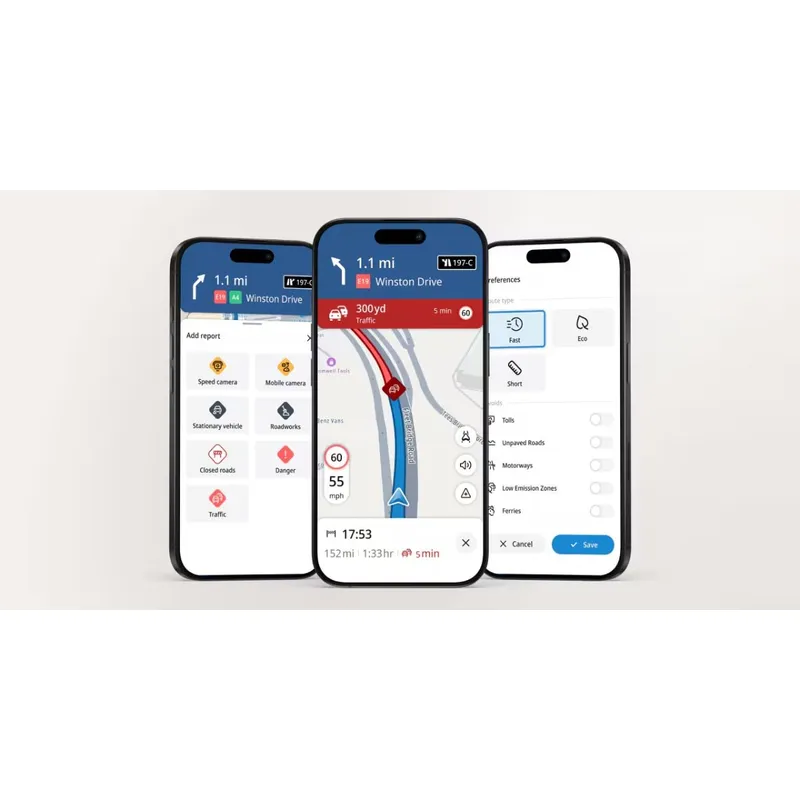
TomTom App

  • TomTom describes its app as combining turn-by-turn navigation, real-time traffic and speed camera information.
  • The app is available to download without an upfront charge, according to TomTom.

Drawback: The camera database and included features can vary by country and app version.

Check price on Amazon UKSponsored link · no live price shown
03RadarbotOfficial manufacturer image

Best for a dedicated free camera-alert app

Radarbot

  • Radarbot’s free plan lists fixed and mobile camera alerts, real-time alerts and offline alerts for one country.
  • The maker says the free version can run in the background.

Drawback: The free tier contains adverts and does not include Android Auto or CarPlay according to Radarbot’s plan guide.

Check price on Amazon UKSponsored link · no live price shown
04

Best for camera reports inside familiar navigation

Google Maps

  • Google documents mobile speed camera incident reporting on compatible Android Auto displays.
  • Reported incidents may appear on the map as drivers approach, subject to the app’s alert settings.

Drawback: Mobile camera reports are user-contributed and availability varies by country.

05

Best for drivers already using Sygic navigation

Sygic GPS Navigation

  • Sygic lists speed camera warnings among its navigation features; mobile camera alerts require an internet connection.
  • The maker supports Android Auto but says some phone-app features are limited on the car display.

Drawback: Some Android Auto features require an eligible Premium+ subscription or a previously purchased Premium licence.

Compare them side by side

WazeOfficial manufacturer imageWazeTomTom AppOfficial manufacturer imageTomTom AppRadarbotOfficial manufacturer imageRadarbotGoogle MapsSygic GPS Navigation
Best useCommunity reportsNavigation and camera infoDedicated alertsMobile camera reportsNavigation
Android AutoSupportedCheck current app supportGold planSupportedSupported
Free optionYesDownload freeYes, with advertsYesYes; some features paid
Camera data typeReported and partner entriesTomTom databaseDatabase and real-time reportsReported incidentsPremium+; internet required
Offline alerts——Single country in Free plan——
Check price on Amazon UKCheck price on Amazon UKCheck price on Amazon UK

Common questions

Questions before you buy

Which Android app gives free speed camera alerts?

Waze provides camera alerts based on partner and map-editor entries, while Radarbot offers a free tier with fixed and mobile camera alerts. Their coverage, adverts and connected-car features differ, so check the current plan details.

Does Android Auto show speed camera warnings?

Some navigation apps can display camera or incident information on compatible Android Auto systems. Availability depends on app, region, phone and vehicle; prepare the setup while parked.

Is Radarbot free on Android Auto?

Radarbot’s plan guide says Android Auto and CarPlay are included with Gold, while the free plan does not include those connections. Check the current plan page for any changes.

Why did Waze not warn me about a camera?

Waze says a camera may be missing if it has not been reported by an editor or partner. Alert settings and how the camera entry is categorised can also affect what appears.

Can I use a speed camera app while driving in the UK?

Set up the app before the journey. GOV.UK says you must not hold and use a phone while driving; hands-free use is allowed only when you remain in proper control and the device does not block your view.

Sources and how we chose